Posts made by benardag
-
How to Resolve the 401 Unauthorized Error When Accessing GitHub Maven Packages
General DiscussionIf you encounter the following error while developing an Android app, it might be due to authentication issues with GitHub Maven packages:
* What went wrong:
Execution failed for task ':app:checkDebugAarMetadata'.
> Could not resolve all files for configuration ':app:debugRuntimeClasspath'.
   > Could not resolve com.trustwallet:wallet-core:3.1.27.
     Required by:
         project :app > project :trust_wallet_core
      > Could not resolve com.trustwallet:wallet-core:3.1.27.
         > Could not get resource 'https://maven.pkg.github.com/trustwallet/wallet-core/com/trustwallet/wallet-core/3.1.27/wallet-core-3.1.27.pom'.
            > Could not GET 'https://maven.pkg.github.com/trustwallet/wallet-core/com/trustwallet/wallet-core/3.1.27/wallet-core-3.1.27.pom'. Received status code 401 from server: Unauthorized

* Try:
> Run with --stacktrace option to get the stack trace.
> Run with --info or --debug option to get more log output.
> Run with --scan to get full insights.

* Get more help at https://help.gradle.org

BUILD FAILED in 7s
Running Gradle task 'assembleDebug'...                              7.6s
[!] Gradle threw an error while downloading artifacts from the network.
Error: Gradle task assembleDebug failed with exit code 1
Understanding the Issue
This error indicates that while trying to resolve dependencies from GitHub Packages, the authentication failed with a 401 Unauthorized error. GitHub Packages requires credentials even for public packages, which means you need an access token to publish, install, and delete packages regardless of their visibility.
For more information on GitHub access tokens, refer to the Git-Hub access tokens .
Solution: Configuring GitHub Credentials in Gradle
To resolve this issue in your Android project using Gradle, you need to configure your GitHub credentials in the
gradle.propertiesfile. Here are the steps:- Add Credentials to
gradle.properties:
Create or edit the
gradle.propertiesfile in your project’s root directory (or if you are using flutter in android part) and add your GitHub username and access token:properties
gpr.user=your-github-username gpr.key=your-github-access-token- Update
build.gradleto Use the Credentials:
Edit your project-level (android level)
build.gradlefile to include the GitHub repository and use the credentials fromgradle.properties:groovy
allprojects {
    repositories {
        google()
        mavenCentral()
        maven {
            url = "https://maven.pkg.github.com/trustwallet/wallet-core/com/trustwallet/wallet-core-proto/3.1.27/wallet-core-proto-3.1.27.pom"
            credentials {
                username = project.findProperty("gpr.user")
                password = project.findProperty("gpr.key")
            }
        }
    }
}
NB: you can check how to configure this in other building toolsIn the above example, replace https://maven.pkg.github.com/trustwallet/wallet-core/com/trustwallet/wallet-core-proto/3.1.27/wallet-core-proto-3.1.27.pom with the appropriate URL for the package you need to access.
Example
Here’s a full example of how your build.gradle file might look after making these changes:groovy
apply plugin: 'com.android.application'
apply plugin: 'kotlin-android'
apply plugin: 'kotlin-android-extensions'

android {
    compileSdkVersion 30
    defaultConfig {
        applicationId "com.example.yourapp"
        minSdkVersion 21
        targetSdkVersion 30
        versionCode 1
        versionName "1.0"
        testInstrumentationRunner "androidx.test.runner.AndroidJUnitRunner"
    }
    buildTypes {
        release {
            minifyEnabled false
            proguardFiles getDefaultProguardFile('proguard-android-optimize.txt'), 'proguard-rules.pro'
        }
    }
}

repositories {
    google()
    mavenCentral()
    maven {
        url = "https://maven.pkg.github.com/trustwallet/wallet-core/com/trustwallet/wallet-core-proto/3.1.27/wallet-core-proto-3.1.27.pom"
        credentials {
            username = project.findProperty("gpr.user")
            password = project.findProperty("gpr.key")
        }
    }
}

dependencies {
    implementation 'com.android.support:appcompat-v7:28.0.0'
    implementation "org.jetbrains.kotlin:kotlin-stdlib:$kotlin_version"
    implementation 'com.trustwallet:wallet-core:3.1.27@aar'
    implementation 'com.trustwallet:wallet-core-proto:3.1.27'
    testImplementation 'junit:junit:4.12'
    androidTestImplementation 'androidx.test.ext:junit:1.1.2'
    androidTestImplementation 'androidx.test.espresso:espresso-core:3.3.0'
}
With these configurations, Gradle will use the provided credentials to authenticate and access the necessary GitHub packages.
This should help you resolve the 401 Unauthorized error and successfully build your project using dependencies hosted on GitHub Packages.
Note: Understanding the problem is half the solution. Since this error can occur whenever you are trying to use a GitHub package, the solution provided here can offer valuable insights to help you resolve similar issues in other projects, not just Android ones. - Add Credentials to
-
Kernel Panic in Linux Systems
General DiscussionA few days ago, I encountered a problem with a kernel panic. The issue occurred when I tried to install version 2.28 of the GNU C Library directly from the GitHub source code in my Ubuntu computer version 18.04. After attempting to restart my computer, I received an error message indicating a kernel panic.
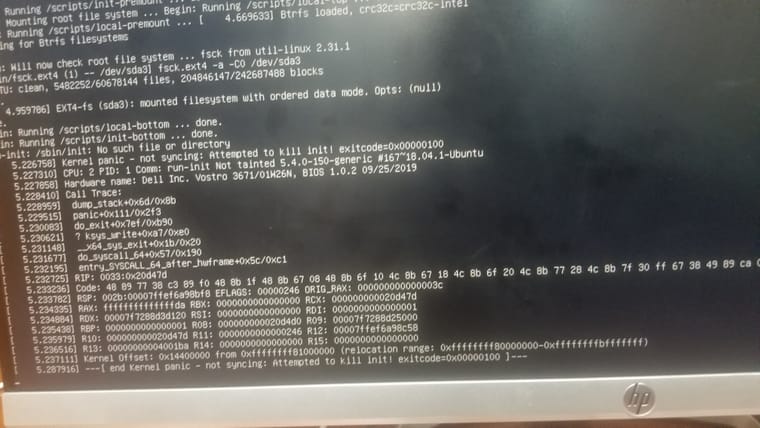
after searching of some internet resources i got these information
A kernel panic is one of several Linux boot issues. In basic terms, it is a situation when the kernel can't load properly and therefore the system fails to boot. During the boot process, the kernel doesn't load directly. Instead, initramfs loads in RAM, then it points to the kernel (vmlinuz), and then the operating system boots. If initramfs gets corrupted or deleted at this stage because of recent OS patching, updates, or other causes, then we face a kernel panic.
When a Linux system boot process starts after the Master Boot Record (MBR) step, GRUB is loaded. The kernel needs to be loaded into RAM to start the OS, but the kernel is situated on the hard disk (/boot/vmlinuz), and the hard disk is not yet mounted on /. Without mounting, no files can be accessed, even the kernel. To overcome this, first initramfs/initrd loads in RAM directly and mounts the /boot partition in read-only mode. Next, it mounts the hard disk on the / partition, and the process continues.
Main Causes of Kernel Panic
- If the initramfs file gets corrupted.
-
If initramfs is not created properly for the specified kernel. Every kernel version has its own corresponding initramfs. -
If the installed kernel is not supported or not installed correctly. -
If recent patches have some flaws. -
If a module has been installed from online or another source, but the initrd image is not created with the latest installed module.
I solved it by installing new OS, but that is a least way if you have important files you need to backup from your system
Any possible steps for Troubleshooting the problem.